SignalWhale
A self-hosted prediction-market whale tracker. SignalWhale watches Polymarket for large trades in real time, profiles every whale's true track record, and alerts your members — in-app, browser push, email, Telegram or webhook — the moment smart money moves.
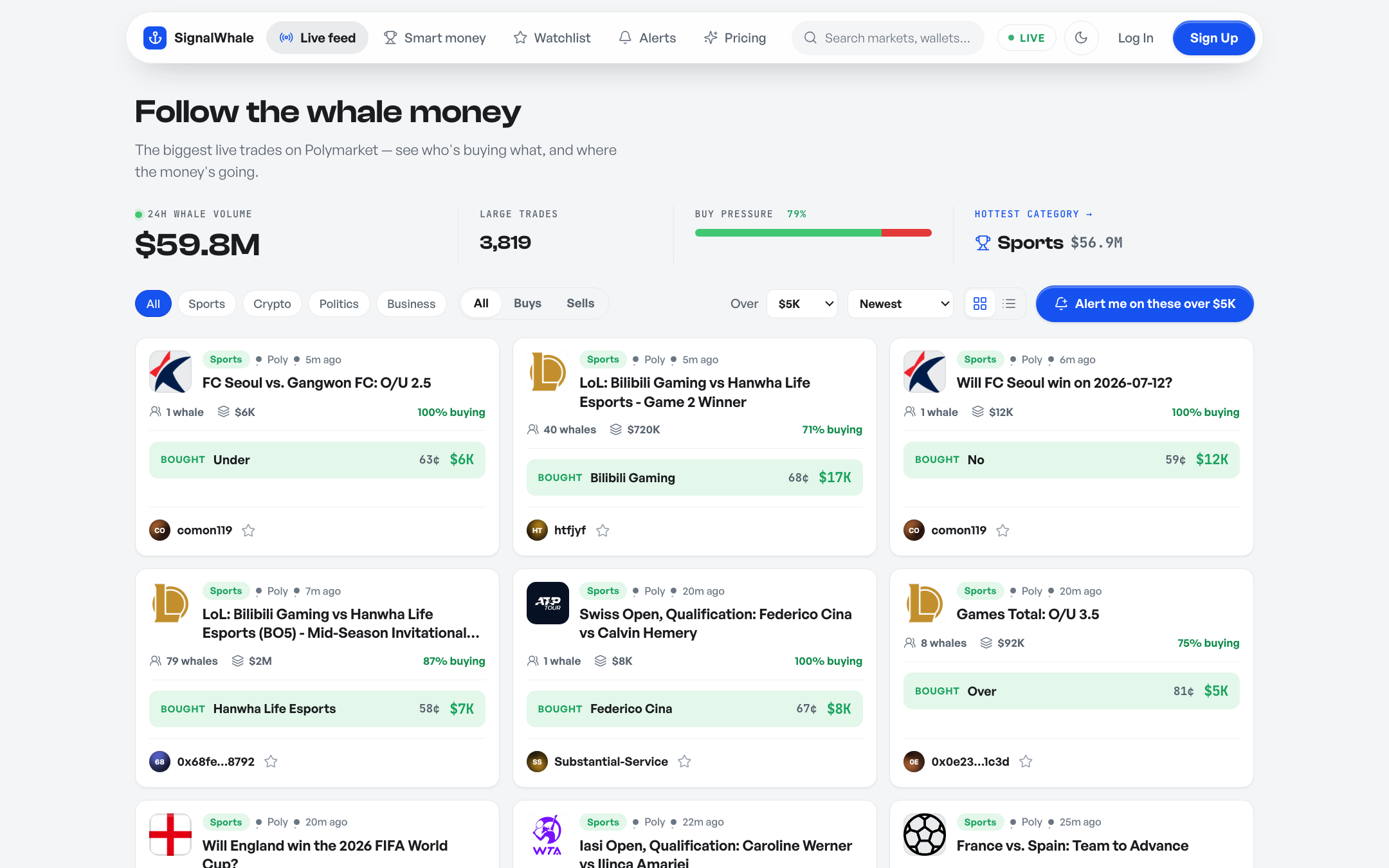
The live feed — whale trades grouped by market, with money-flow overview, filters and live updates.
Overview
SignalWhale is a Laravel 13 application. Everything runs on your own server: trades are pulled from Polymarket's public market-data APIs (no API key, no account, no wallet — see the full endpoint reference), stored in your database, and served from your domain. Trader photos, market thumbnails, fonts and icons are all cached or bundled locally — the rendered pages make zero external requests.
- Live whale feed — large trades grouped by market, money-flow overview band, filters, grid/list views, live polling
- Smart-money leaderboard — whales ranked by real profit, win rate and volume, with a top-3 podium
- Whale profiles — win rate, P&L, W/L streak, open positions, biggest settled results
- Market pages — live odds, real volume/liquidity, price history chart, top holders, whale entries vs exits
- Alerts — rules by size / side / category / keyword / wallet → in-app bell, browser push, email, Telegram, webhook, with a per-channel delivery log
- Member accounts — watchlists, weekly digest email, optional Stripe-powered Pro plan with unlimited alerts + CSV export
- Admin panel — users, pipeline settings, announcements, audit log
- Web installer — zero-terminal setup in under a minute
Product tour
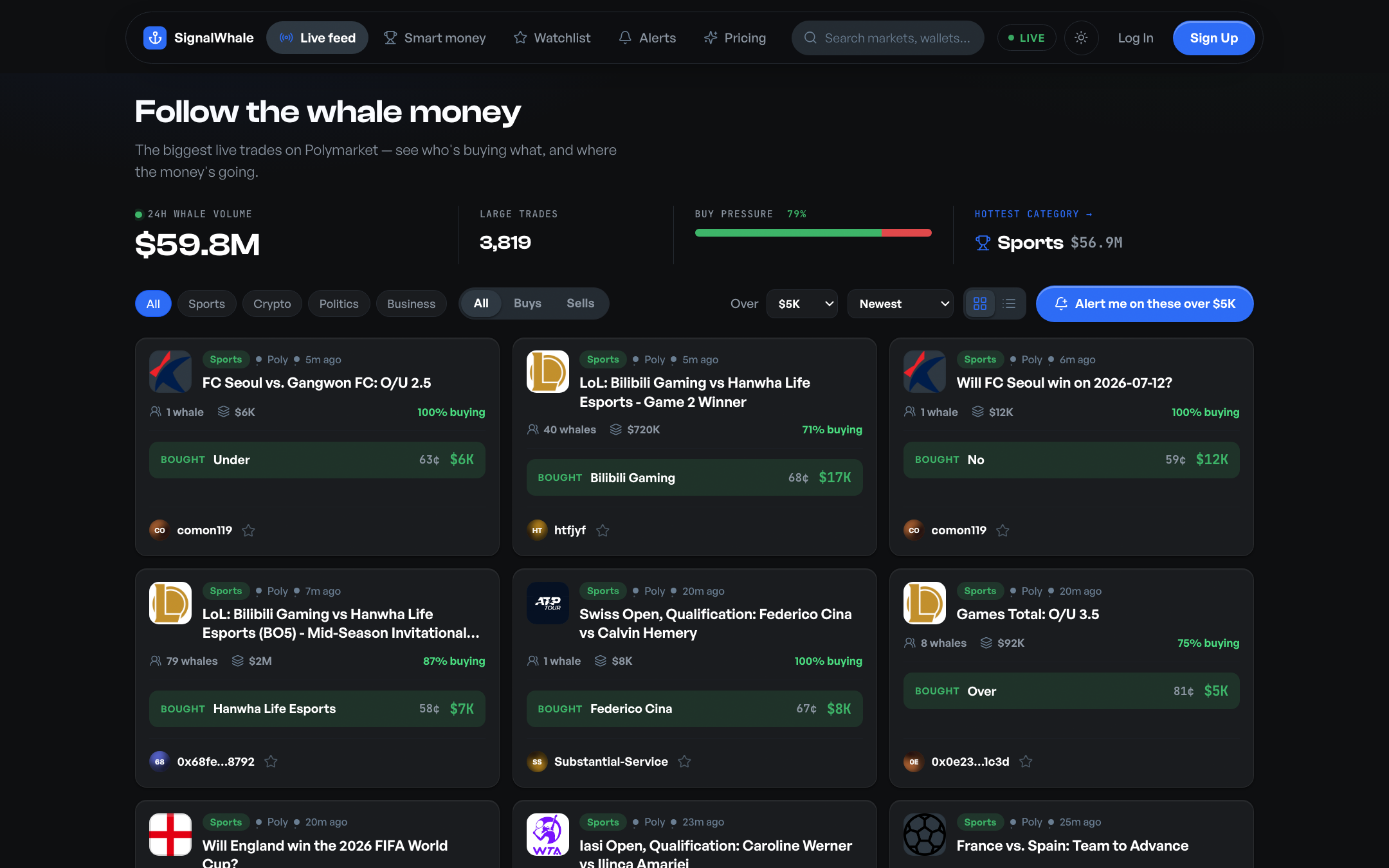
Dark theme — one click, fully themed.
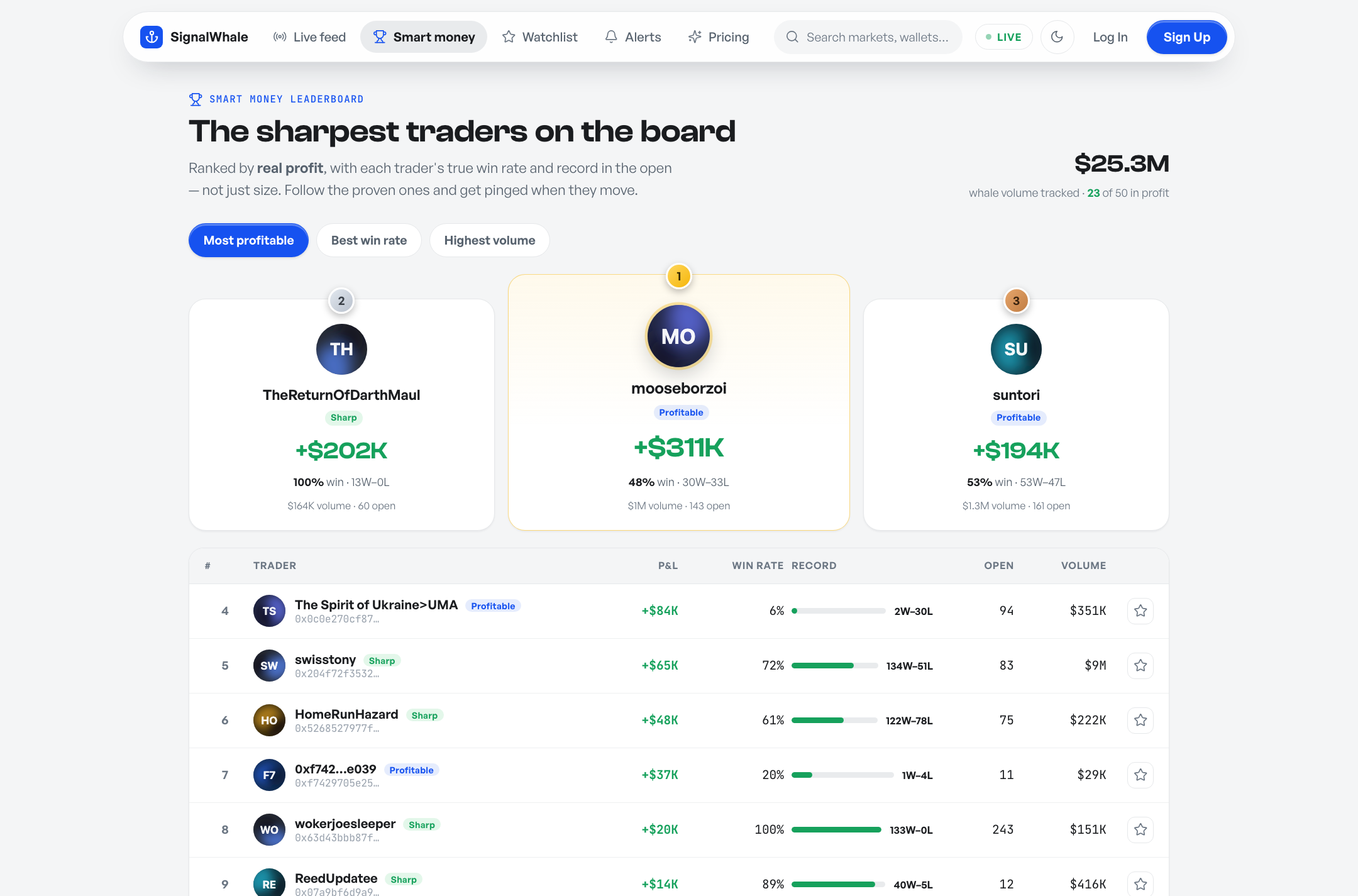
Smart-money leaderboard with podium.
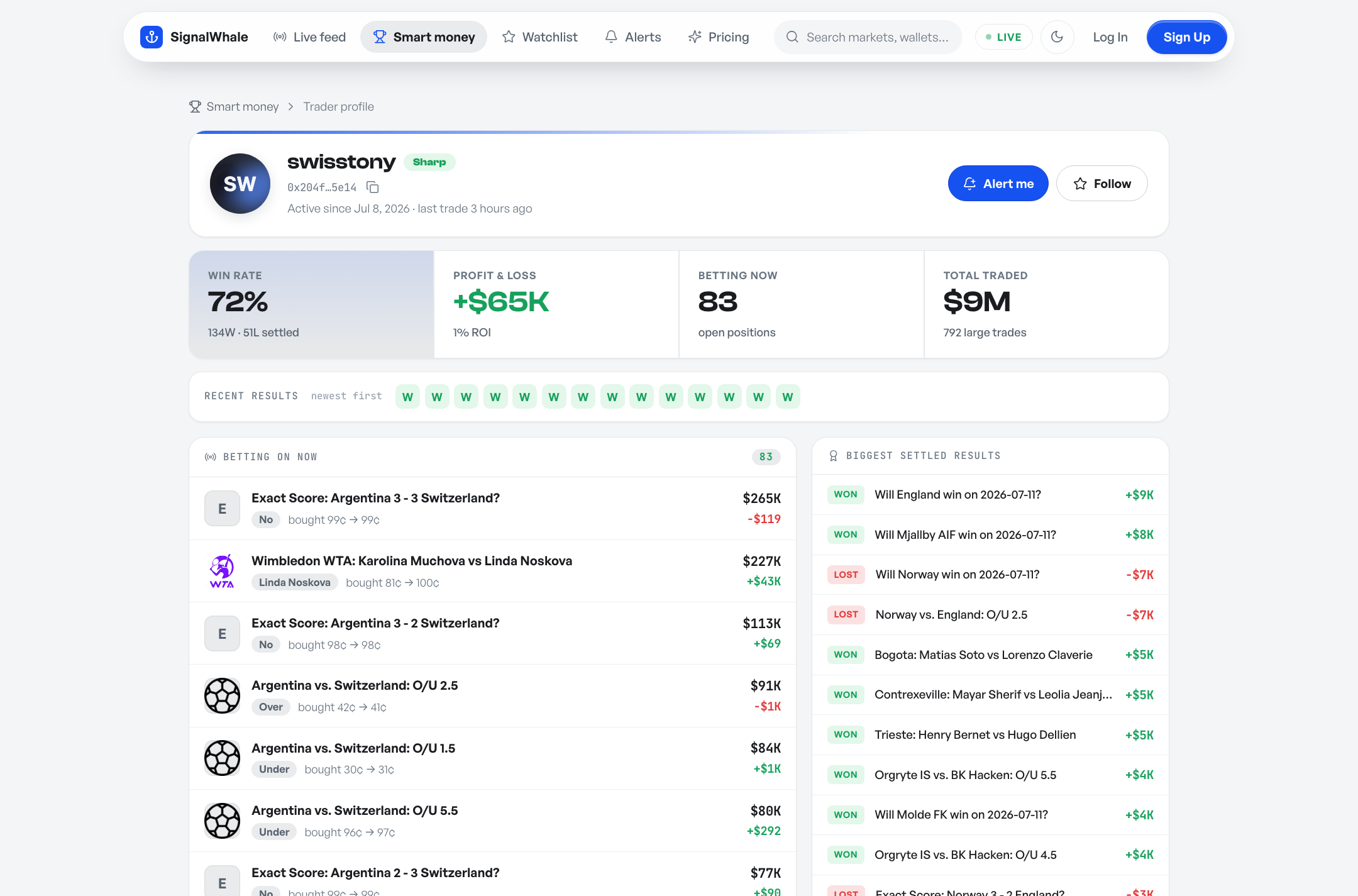
Whale profile — real win rate, P&L, streak, open bets.
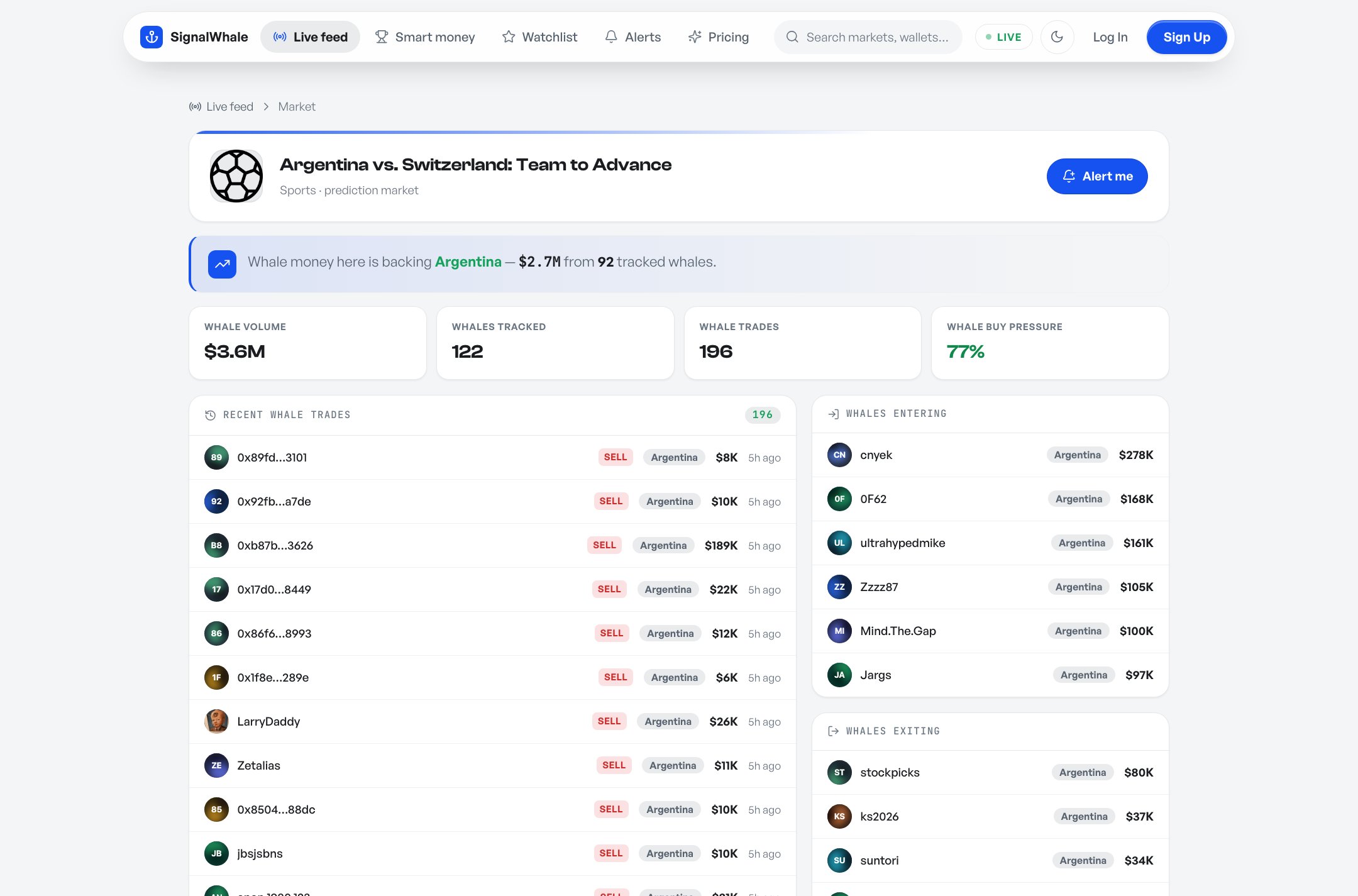
Market page — live odds, holders, whale signal.
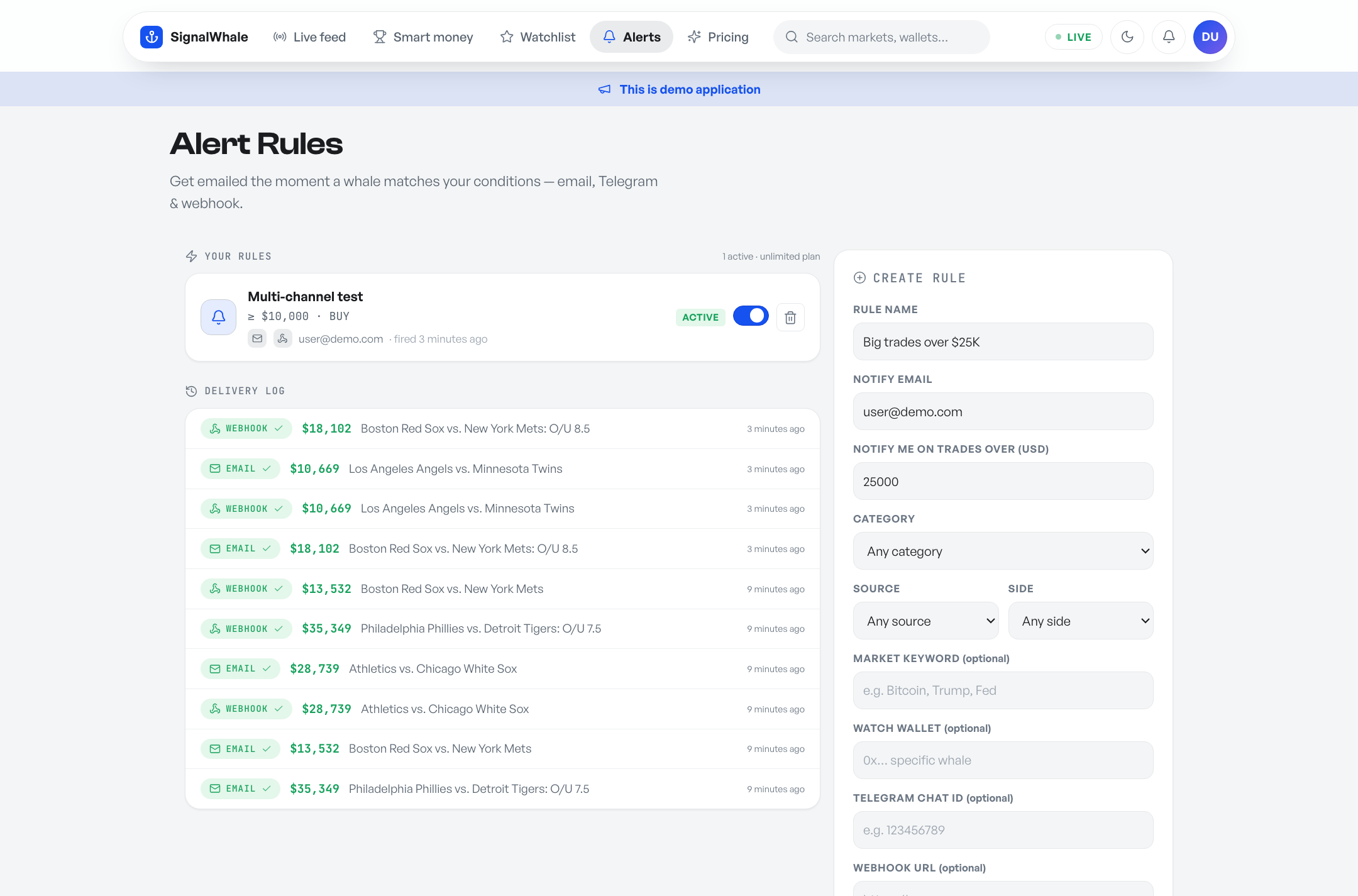
Alert rules with per-channel delivery log.
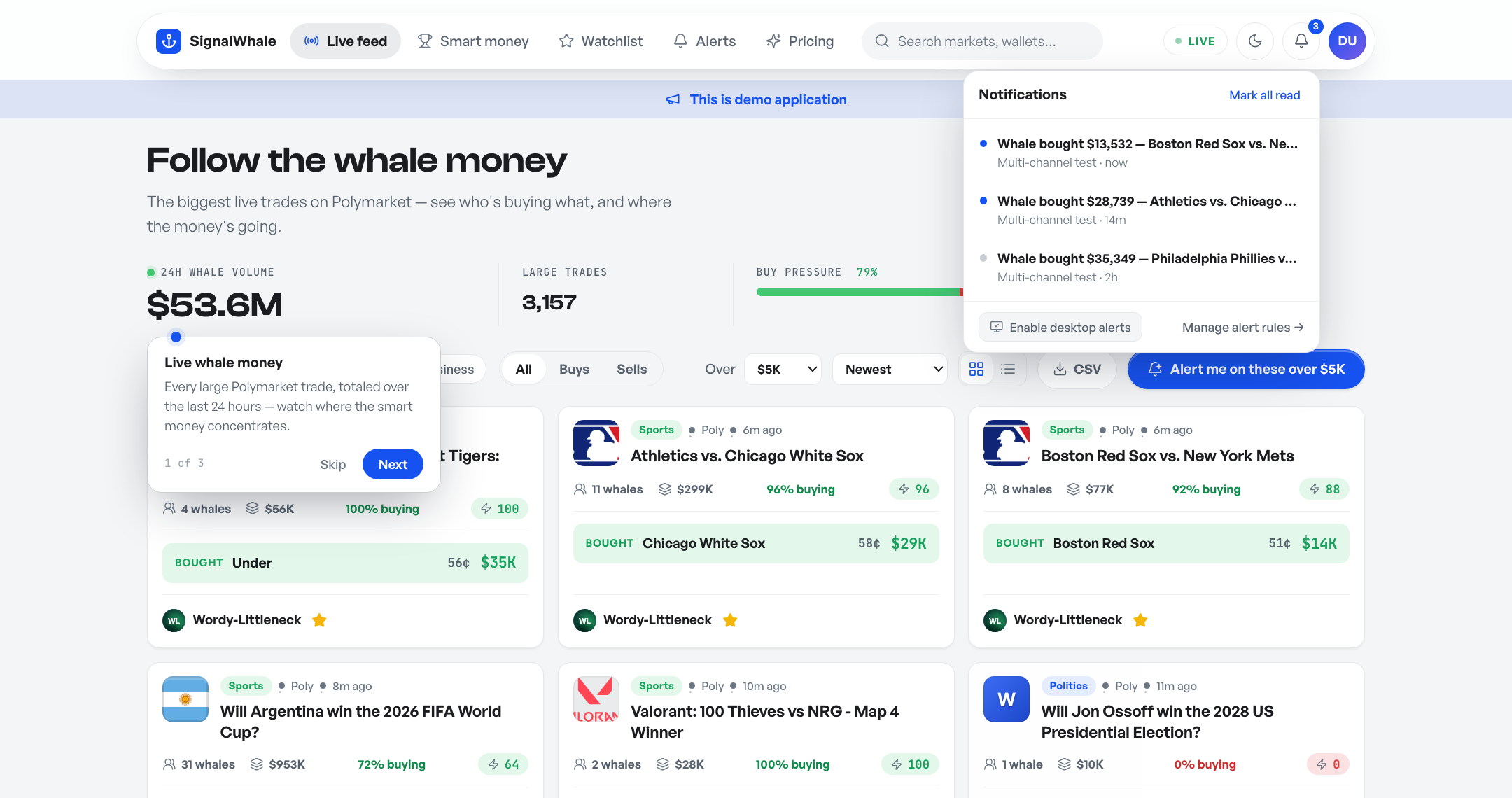
In-app inbox + optional desktop push.
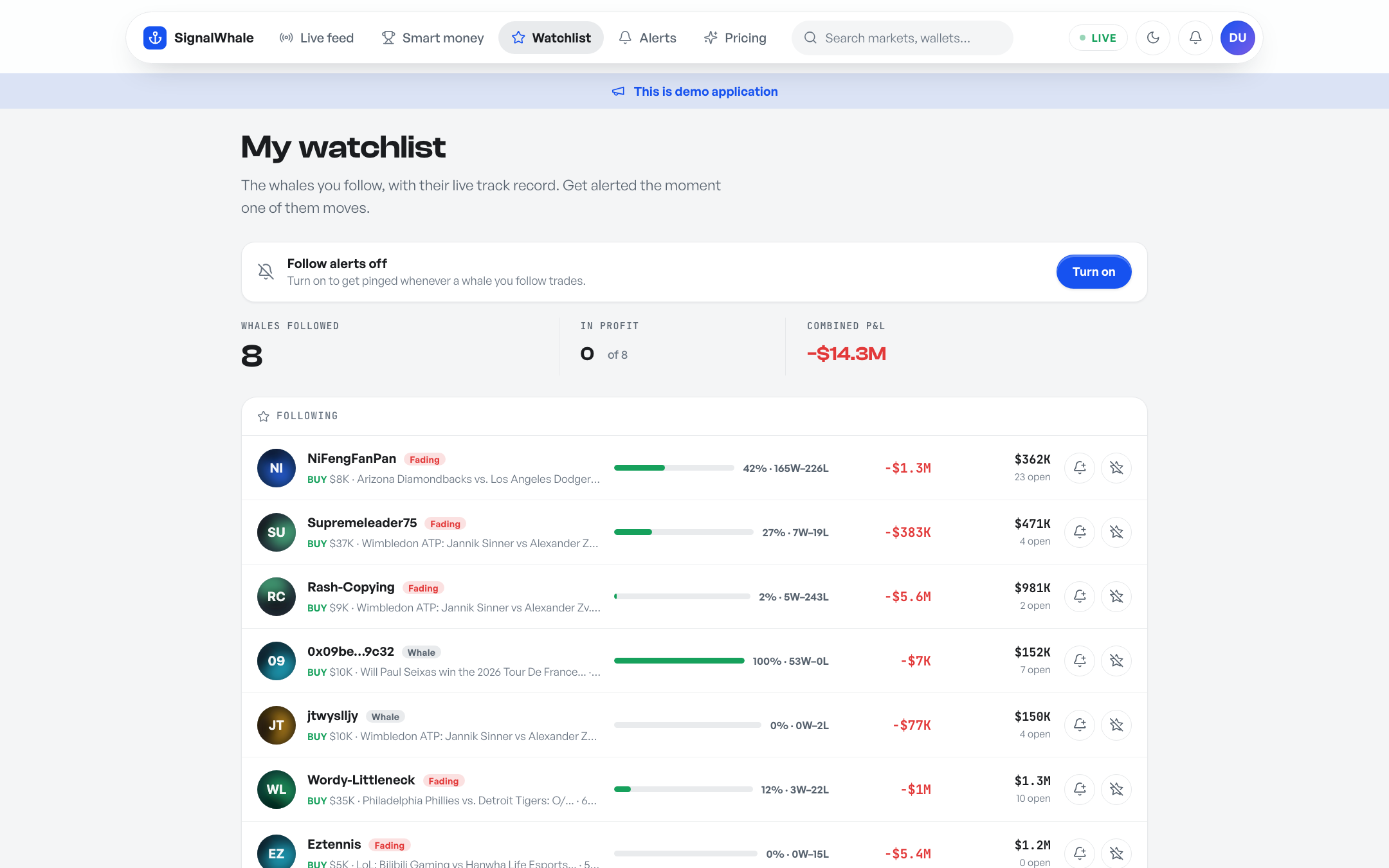
Watchlist — followed whales with records.
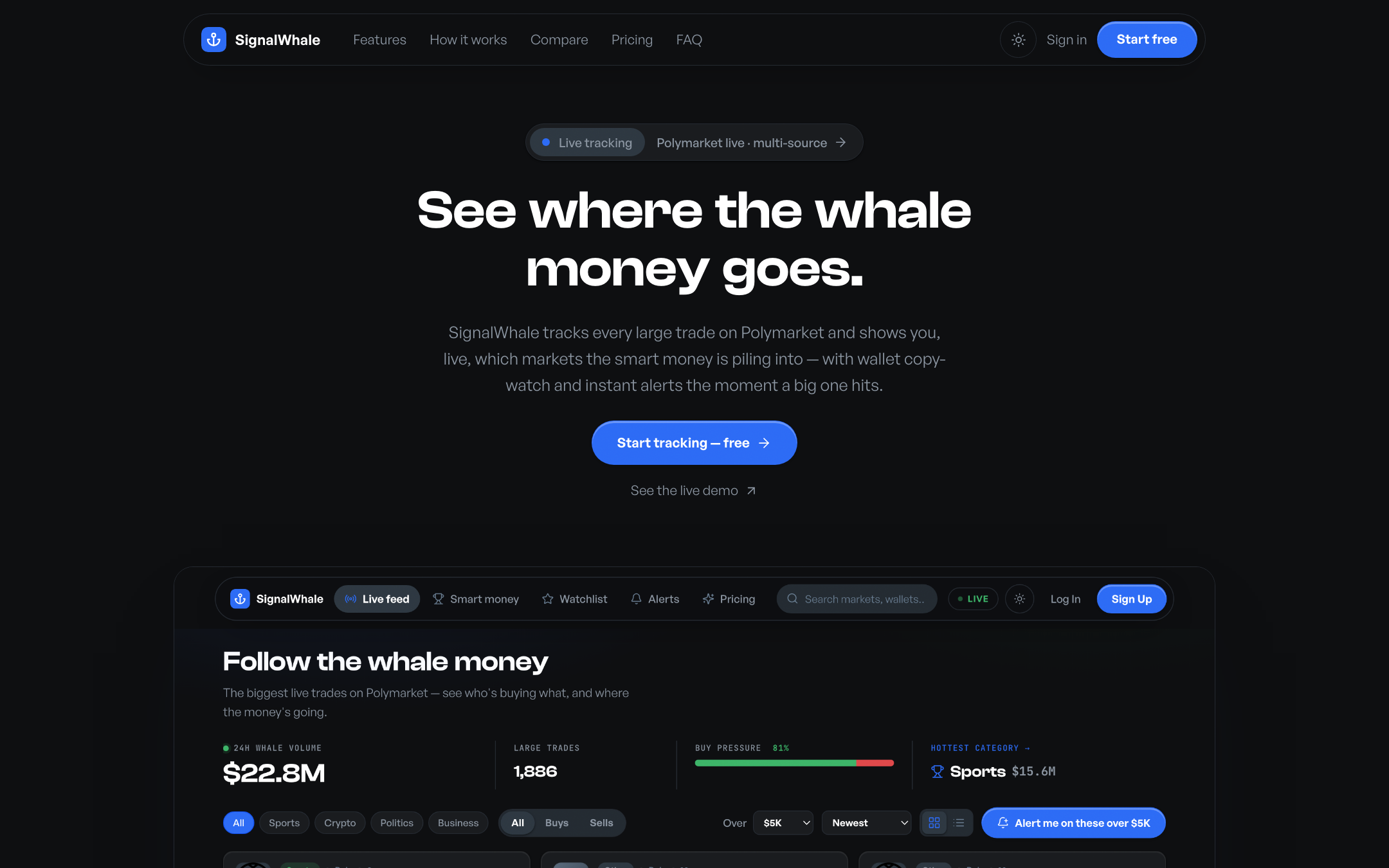
Included marketing landing page.
Server requirements
Any hosting that runs Laravel works — shared hosting (cPanel/Plesk), a VPS, or Docker. The web installer verifies every requirement automatically before it lets you proceed.
| Requirement | Notes |
|---|---|
| PHP 8.3+ | 8.4 supported |
| PHP extensions | openssl, pdo_sqlite or pdo_mysql, mbstring, curl, fileinfo — standard on almost every host |
| Database | SQLite (zero-config, recommended) or MySQL 8 / MariaDB 10.6+ |
| Web server | Apache (.htaccess included) or Nginx — a ready-to-use server block is below |
| Outbound HTTPS | The server must be able to reach *.polymarket.com (see endpoints) to pull trade data |
| Cron | One standard entry (below). No cron? The built-in self-healing sync keeps data fresh from page traffic. |
| Node.js | Not required. Compiled frontend assets ship in public/build. Node is only needed if you edit CSS/JS. |
Installation
A — Web installer (recommended)
- Upload the archive to your server and extract it. Point your domain's document root at the
public/folder. - Copy
.env.exampleto.env(most hosting file managers can rename a copy). - Open
https://yourdomain.com— you are redirected to the installer automatically. - The installer checks your server, asks for a database (SQLite needs nothing at all) and your admin account.
- Click Install SignalWhale. It generates the app key, runs migrations, creates your admin account and pulls the first batch of live whale trades. Typically under a minute.
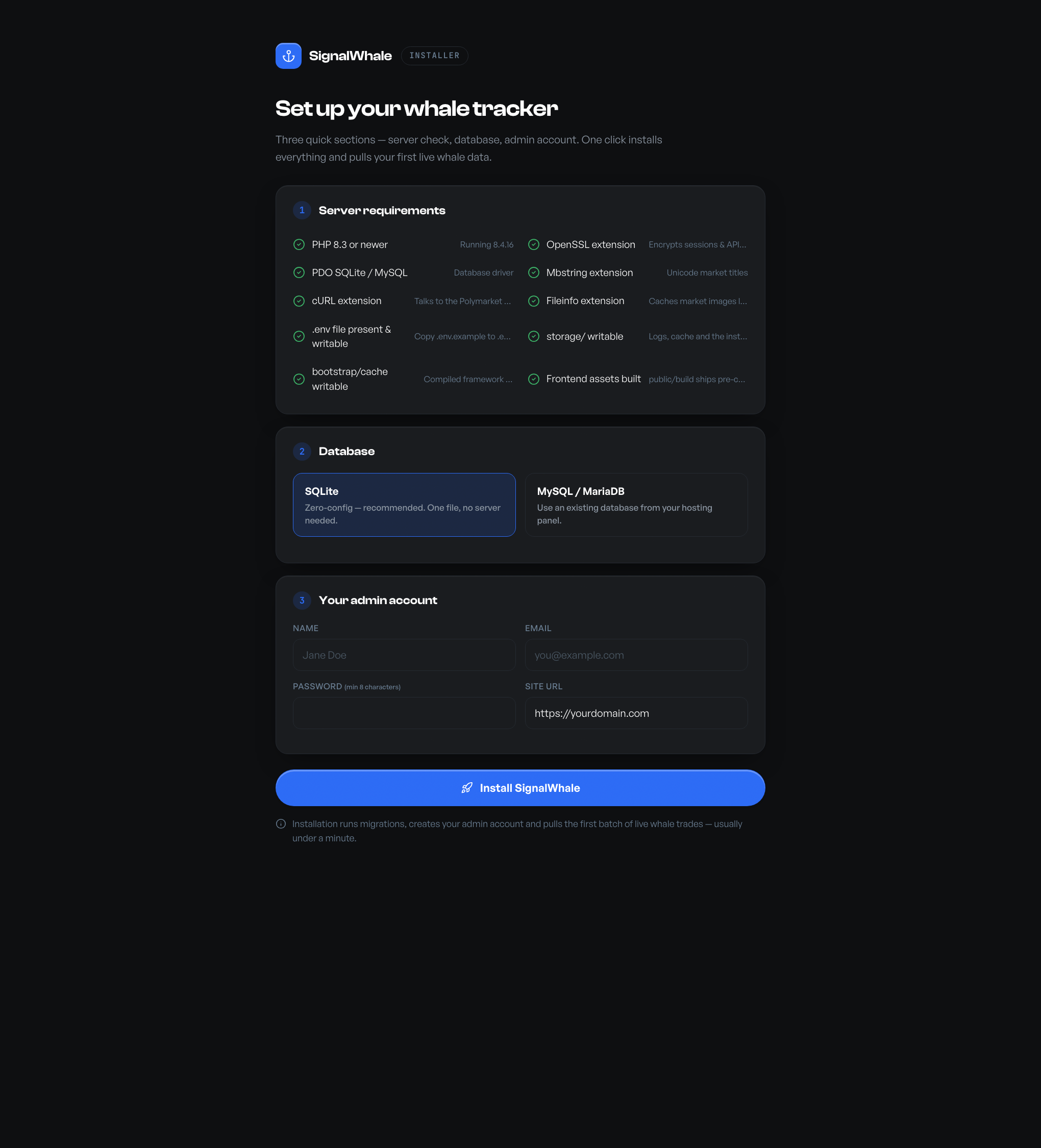
The installer — server check, database, admin account.
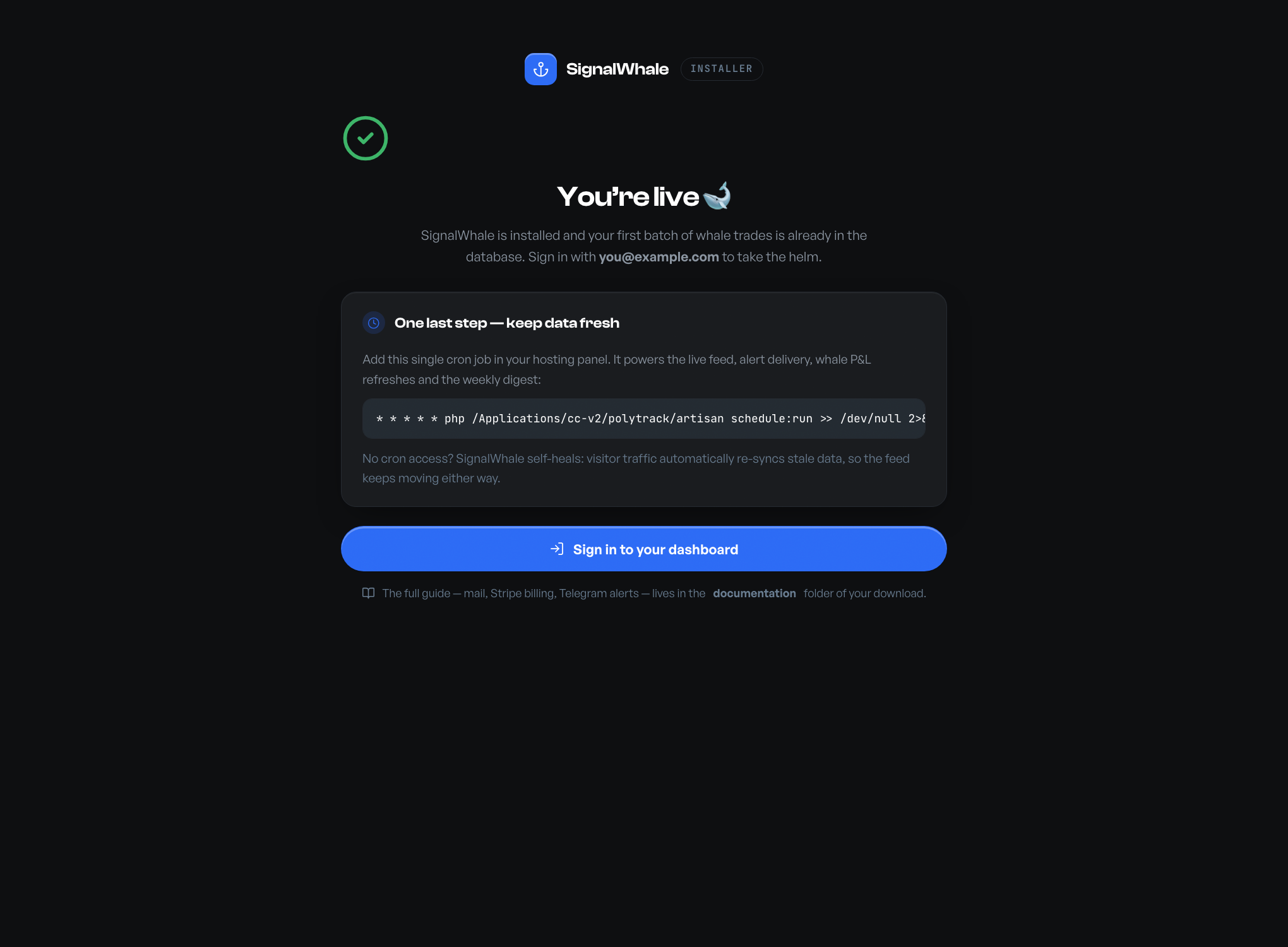
Done — with your cron line ready to copy.
storage/installed.lock when it finishes and locks itself — it cannot be re-run against a live site (re-attempts return HTTP 403).Nginx server block
Apache works out of the box via the bundled .htaccess. On Nginx, use this server block (adjust paths and PHP version):
server {
    listen 80;
    server_name yourdomain.com;
    root /var/www/signalwhale/public;
    index index.php;

    location / { try_files $uri $uri/ /index.php?$query_string; }
    location ~ \.php$ {
        include snippets/fastcgi-php.conf;
        fastcgi_pass unix:/run/php/php8.3-fpm.sock;
    }
    location ~ /\.(?!well-known) { deny all; }
}
Manual MySQL import (optional)
Prefer creating the database yourself via phpMyAdmin? Import
database/sql/signalwhale-mysql.sql (structure only, no data), set your
DB_* values in .env, and the installer will detect the schema and skip
migration. Most buyers won't need this — the installer and php artisan migrate
create everything automatically on both SQLite and MySQL.
B — Manual install (terminal)
cp .env.example .env
php artisan key:generate
touch database/database.sqlite     # or set DB_* in .env for MySQL
php artisan migrate --force
php artisan whales:sync            # first data pull
php artisan tinker --execute="App\Models\User::create(['name'=>'Admin','email'=>'you@example.com','password'=>'choose-a-password','plan'=>'pro','is_admin'=>true,'terms_accepted_at'=>now()]);"
Cron job — keep the feed live
One cron entry powers everything: trade syncing, whale P&L refreshes, profile/image caching, alert delivery and the weekly digest (the individual schedules are listed in the pipeline section).
* * * * * php /path/to/signalwhale/artisan schedule:run >> /dev/null 2>&1In cPanel: Advanced → Cron Jobs → add the line above with your real path. In Plesk: Tools & Settings → Scheduled Tasks.
How the data pipeline works
Understanding the flow makes everything else obvious:
Polymarket public APIs
      │
      ▼  whales:sync (every 5 min)
whale_trades table  ──►  AlertEvaluator ──► bell / push / email / Telegram / webhook
      │                                     (alert_events dedupes, alert_deliveries logs)
      ▼  whales:profiles (hourly) · whales:pnl (every 30 min) · whales:market-icons (hourly)
traders + trader_positions tables · public/avatars · public/market-icons
      │
      ▼
Feed · Leaderboard · Whale profiles · Market pages · Digest email| Command | Schedule | What it does |
|---|---|---|
whales:sync | every 5 min | Pulls the latest large trades, stores new ones (deduped by external ID), evaluates alert rules |
whales:profiles | hourly | Resolves display names + profile photos for newly-seen wallets; photos are downloaded to public/avatars |
whales:pnl | every 30 min | Refreshes each whale's track record — P&L, win rate, open/settled positions |
whales:market-icons | hourly | Caches market thumbnails to public/market-icons so cards render from your domain |
whales:digest | Mondays 08:00 | Emails opted-in members the week's whale summary |
whales:prune | daily 03:30 | Deletes trades older than the admin-set retention window (0 = keep forever) |
whales:resolve | every 6 h | Scores resolved markets: was the whale majority on the winning side? Powers the accuracy scoreboard |
whales:snapshot | automatic fallback | Loads the bundled snapshot of real historical trades when the market API is unreachable — auto-replaced (and purged) the moment live data arrives |
Every command is safe to run by hand (php artisan whales:sync) and safe to run repeatedly — inserts are idempotent.
External APIs & endpoints
SignalWhale consumes public, unauthenticated, read-only market-data endpoints. There are no API keys to obtain, nothing to sign up for, and no wallet or exchange account involved. Below is every external endpoint the application calls, exactly as it appears in the code.
Polymarket — Data API (data-api.polymarket.com)
The heart of the product. Returns the latest filled trades above a cash threshold. filterType=CASH + filterAmount make Polymarket do the whale filtering server-side (only trades ≥ your admin-configured minimum, default $5,000); takerOnly=true returns only taker fills so each economic trade appears once. Each row includes the market title/slug/icon/conditionId, outcome, price, USD size, timestamp, and the trader's wallet + display name.
A wallet's current and redeemable positions with per-position cash P&L — the raw material for each whale's profit and open-bets figures. A position counts as settled only when its market has ended or is redeemable; won/lost then follows the cash P&L sign, so a badge can never contradict the money.
A wallet's activity history. SignalWhale extracts REDEEM events — each redemption is a claimed winning bet. This matters because /positions alone under-counts wins (winning positions get redeemed and disappear); counting redemptions gives every whale an honest win rate.
Top holders per outcome for one market — powers the “Top holders” panel on market pages (who holds Yes vs No, and how much).
Polymarket — Gamma API (gamma-api.polymarket.com)
Full market metadata: question, description, total volume and liquidity, end date, outcome names and live outcome prices (the odds hero), plus the CLOB token IDs needed for the price-history chart. Also queried by condition_ids (with closed=true for resolved markets) by the resolution scorer and as a fallback when a stored slug is event-level. This is how a market page shows the market's real $6M volume even if your instance only captured a handful of its whale trades.
A trader's public display name, pseudonym, verified badge and profile-image URL. The image itself is downloaded once to public/avatars/ and served from your domain forever — never hotlinked. Wallets with no photo (about 90% of traders — same on Polymarket itself) get a deterministic generated avatar, rendered locally.
Polymarket — CLOB API (clob.polymarket.com)
Time-series price history for one outcome token — powers the probability chart on market pages (price of Yes ≈ implied probability). fidelity=360 returns 6-hour buckets over the market's life; degenerate/flat histories are detected and the chart is replaced with an honest empty state.
Kalshi (api.elections.kalshi.com — disabled by default)
Recent public trades on Kalshi. The adapter (app/Sources/KalshiSource.php) implements the same MarketSource interface as Polymarket, but it is shipped disabled (SIGNALWHALE_KALSHI=false): Kalshi's API access varies by region and typically requires an account, so most self-hosters can't use it out of the box. Enable it in .env if your server has access — it fails soft (marked unreachable, never breaks the app). Developer docs: docs.kalshi.com.
Outbound integrations (only when you configure them)
Delivers alert messages to a member's Telegram chat. Called only when the operator has set TELEGRAM_BOT_TOKEN and a rule has a chat ID. Docs: core.telegram.org/bots/api.
JSON payload (event, rule, market, outcome, side, size, price, trader, timestamp) to any URL a member configures on their alert rule — Discord/Slack-compatible via their webhook bridges. 8-second timeout, per-delivery success/failure logged.
Subscription checkout and the customer billing portal for the optional Pro plan. Only contacted when STRIPE_KEY/STRIPE_SECRET are set. Docs: docs.stripe.com · Laravel Cashier.
Demo data & previewing
There is no fake data anywhere in SignalWhale. Every trade, odds figure, win rate and avatar you see — including in these screenshots — is live production data pulled from the APIs above. That has two practical consequences:
- A fresh install is immediately real. The installer's first sync typically lands 200–300 live whale trades; within a day of cron running you'll have thousands, plus resolved trader profiles and photos.
- No seed/fixture cleanup. There are no placeholder markets or lorem-ipsum whales to delete before going live.
The demo member account
For local evaluation you can seed a ready-made Pro member so you can try watchlists, alerts, exports and the bell without registering:
php artisan db:seed # creates user@demo.com + admin@demo.com (password: password)The login page shows “Demo user / Demo admin” quick-fill buttons only when these accounts exist. Production installs through the web installer never create it — your live site has exactly the admin account you chose, nothing else.
Resetting your data
php artisan migrate:fresh --force   # wipe everything (users included!)
php artisan whales:sync             # re-pull live data
Local caching & privacy
- Zero third-party requests in the browser. Fonts (Clash Display, General Sans, JetBrains Mono), the Lucide icon set and three.js are bundled in
public/fontsandpublic/vendor. Trader photos and market thumbnails are served frompublic/avatarsandpublic/market-icons. Your visitors' browsers only ever talk to your domain. - Read-only public data. The app displays publicly available market data. It holds no funds, executes no trades, stores no private keys and never asks members for wallet credentials.
- No phone-home. SignalWhale contains no license pings, analytics beacons or update checks.
Email (SMTP)
Email powers password resets, email alerts, optional email verification and the weekly digest. Set your SMTP details in .env:
MAIL_MAILER=smtp
MAIL_HOST=smtp.yourprovider.com
MAIL_PORT=587
MAIL_USERNAME=postmaster@yourdomain.com
MAIL_PASSWORD=your-smtp-password
MAIL_ENCRYPTION=tls
MAIL_FROM_ADDRESS=alerts@yourdomain.com
MAIL_FROM_NAME="SignalWhale"
Any SMTP provider works (your host's mail server, Mailgun, Postmark, SES, Resend…). Test it with Forgot password on the login page. Both transactional emails are fully designed and on-brand:
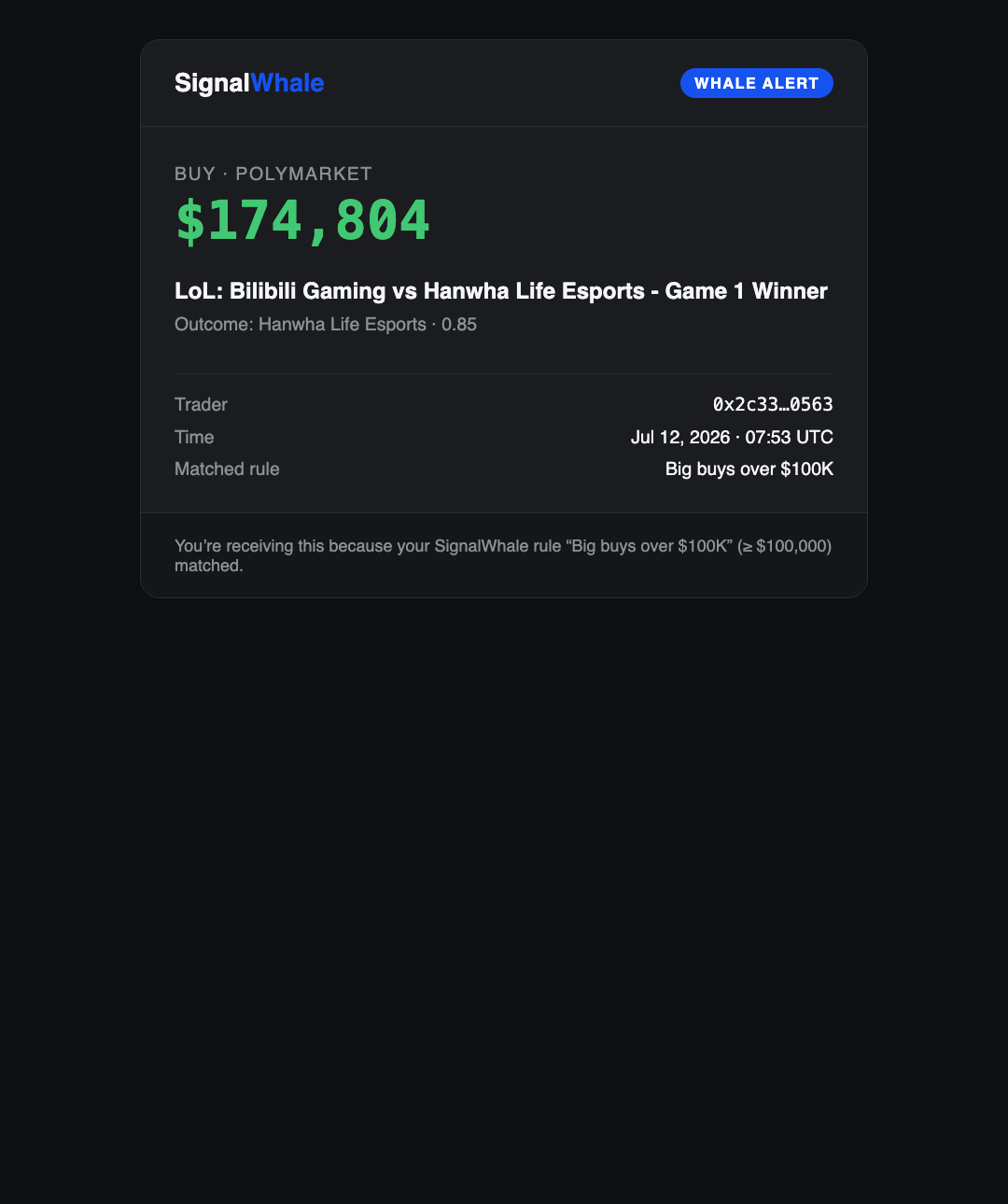
Whale alert email.
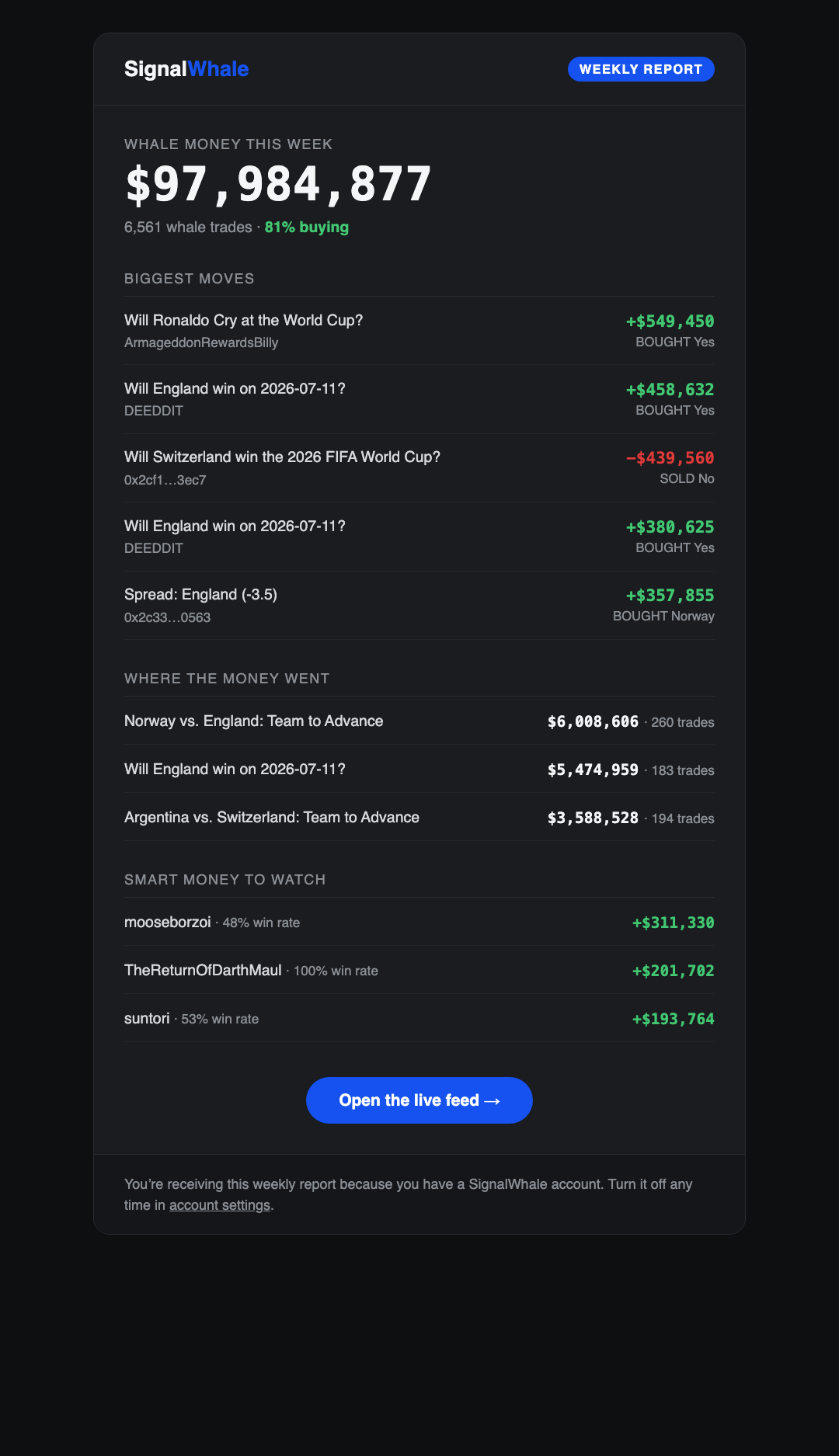
Monday weekly digest.
Admin panel
Sign in with your admin account and open the avatar menu → Admin panel (/admin).
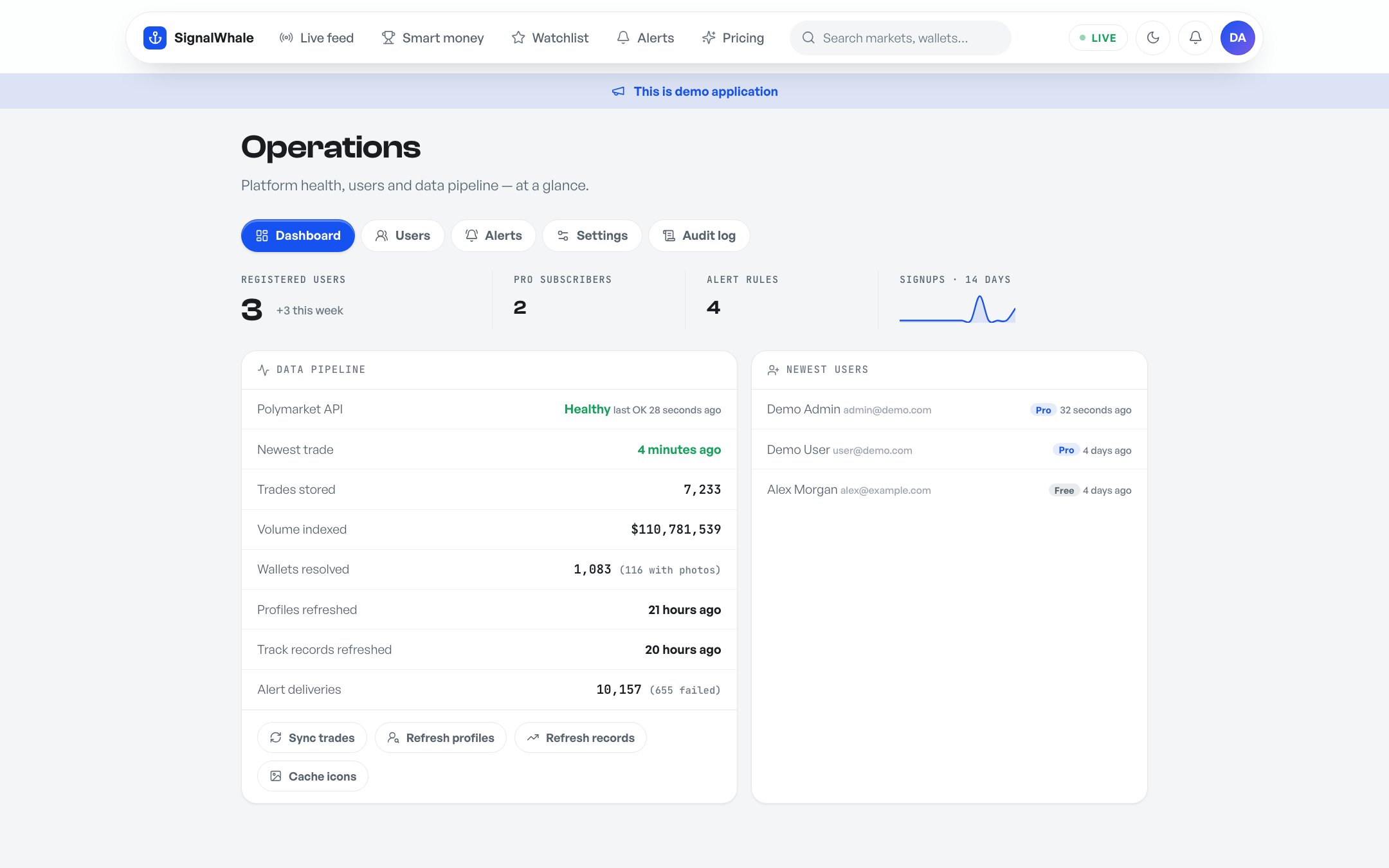
Operations dashboard — members, pipeline health with staleness warning, signup trend.
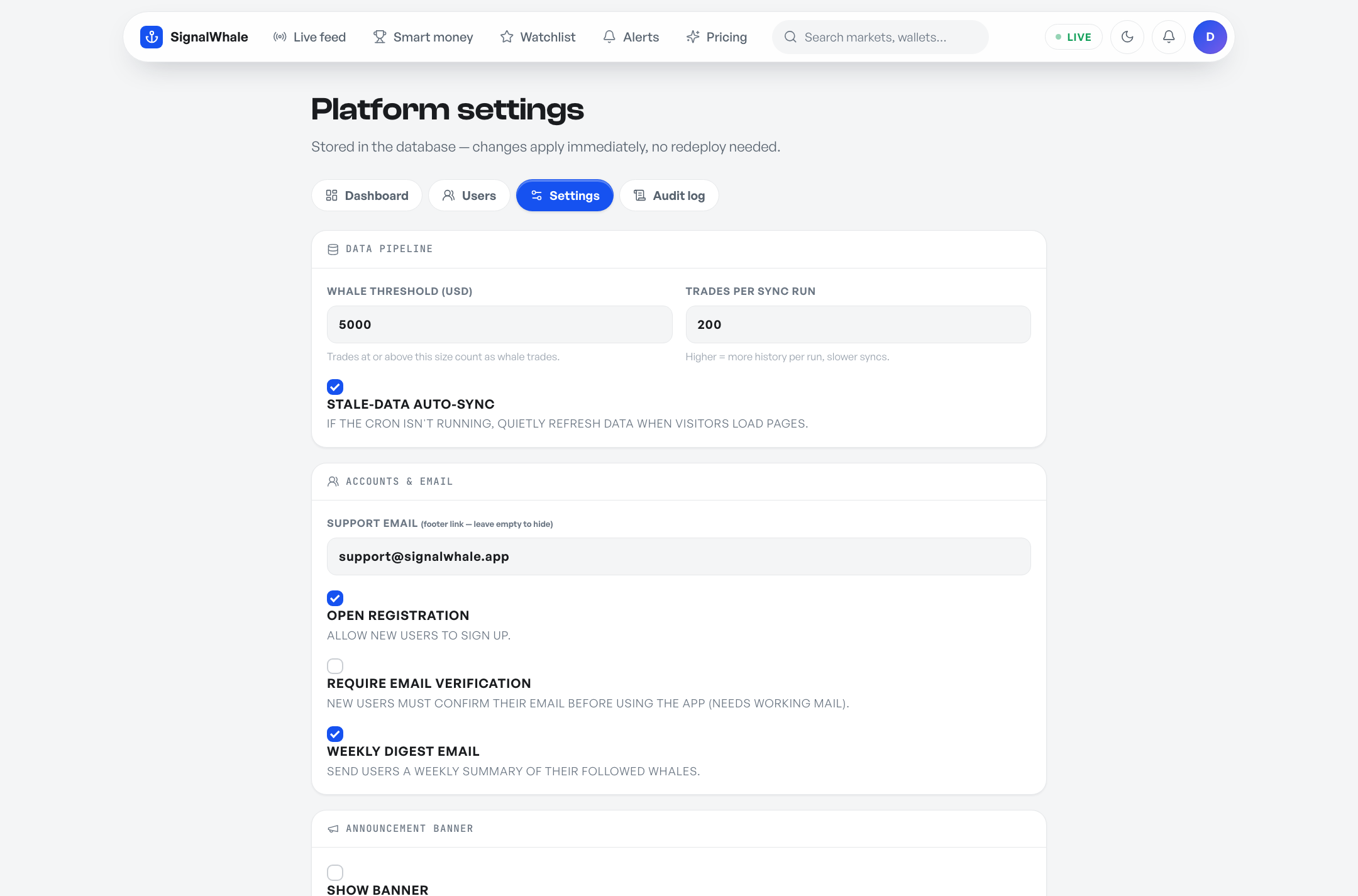
Settings — whale threshold, sync size, account flags, announcement banner.
| Section | What it does |
|---|---|
| Dashboard | Member/trade/alert counts, sync health (warns when data is stale), 14-day signup trend, and one-click pipeline actions (sync trades, refresh profiles/track records, cache icons) |
| Users | Search, quick plan/admin changes, plus a full editor per user: rename, change email, reset password, mark email verified, delete — and “View app as” impersonation (members only, audit-logged, with a return banner). Admins can also create accounts directly and can't demote or delete themselves. |
| Alerts | Every alert rule on the platform with owner, delivery counts and failures — pause or delete any rule |
| Settings | Whale threshold ($), sync batch size, data retention window (auto-prune), support email, open/close registration, require email verification, auto-sync toggle, weekly digest toggle |
| Branding | White-label: rename the product, upload your own logo and pick an accent color — navbar, footer, titles and emails all follow, no code changes |
| Announcement | Site-wide banner (info / success / warning), toggle on/off |
| Audit log | Every admin action with actor and IP |
Stripe billing (optional)
SignalWhale ships with a working Free → Pro upgrade flow via Stripe Checkout (Laravel Cashier). Without Stripe keys the pricing page still renders and everything else works — members simply can't self-upgrade (you can set plans from the admin panel).
- In the Stripe dashboard create a recurring Price (e.g. $9/mo) and copy its
price_…ID. - Add your keys to
.env:STRIPE_KEY=pk_live_… STRIPE_SECRET=sk_live_… STRIPE_PRO_PRICE=price_… - Members upgrade on /pricing; manage/cancel runs through Stripe's hosted billing portal — you never touch card data (SAQ-A scope).
Telegram alerts (optional)
- Message @BotFather on Telegram →
/newbot→ copy the token into.envasTELEGRAM_BOT_TOKEN=… - Start a chat with your new bot (press Start).
- Get your chat ID: open
https://api.telegram.org/bot<TOKEN>/getUpdatesafter sending the bot any message. - Paste the chat ID into any alert rule on /alerts — matching whale trades now land in Telegram.
Feature guide
Alert rules & the bell
Members create rules on /alerts: minimum trade size, side (buy/sell), category, keyword, or a specific wallet. Every matching trade lands in the in-app bell inbox (always) plus any configured channel — email, Telegram, webhook. Each delivery attempt is logged per channel with success/failure. The bell polls every 30 seconds on every page; members can additionally enable native desktop notifications (one click, browser-permission gated) that fire when the tab is in the background.
Watchlist, following & follow alerts
Starring a whale — on any trade card, the leaderboard or a profile — adds them to the member's watchlist and stars all of that whale's cards across the feed. The watchlist page shows each followed whale's live record: tier, win rate, W/L bar, P&L, open positions. A one-click Follow alerts switch pings the member (bell + desktop push) whenever any whale they follow trades — copy-trading, closed loop.
CSV export
Pro members can download the recent whale trades (up to 10,000 rows) and the full leaderboard as CSV from the feed and leaderboard toolbars; free members are pointed at the upgrade page. Files stream (no memory limits) and open cleanly in Excel.
Whale Score
Every market carries a 0–100 Whale Score — buy pressure weighted by each whale's proven track record over the last 72 hours. A sharp whale (≥60% win rate over ≥10 settled bets) moves the score at 2× weight; a whale with a losing record counts at 0.5×. Shown on feed cards and market pages; the feed can sort by it. The exact formula lives in app/Services/WhaleScore.php.
The accuracy scoreboard
Every six hours whales:resolve checks tracked markets for resolution and records whether the whale majority backed the winning outcome. The leaderboard shows the running total (“smart money called 113 of 169 resolved markets — 67% right”) and each resolved market page shows its verdict. Real receipts, generated automatically.
Market watchlists
Besides following whales, members can watch markets — one click on any market page. Every new whale trade in a watched market lands in their bell (and desktop push). Watched markets get their own section on the watchlist page.
Copy-trade simulator
Whale profiles include an honest “if you'd copied” panel: a flat $100 on each of the trader's recent settled bets, computed from real cash P&L. It shows losses as readily as gains, ignores fees/slippage by stated assumption, and carries a not-advice disclaimer.
Two-factor authentication
Any member can enable TOTP two-factor auth from account settings — scan a server-rendered QR (or enter the key manually) in Google Authenticator, 1Password or Authy, confirm one code, done. Sign-ins then require a 6-digit code after the password. Fully offline: no SMS gateway, no external service. Login, registration and password-reset endpoints are rate-limited against brute force, and members can delete their own account (password-confirmed) per the privacy policy.
First-visit tour
New visitors to the feed get a dismissible 3-step tour (live money → check the trader → follow & get alerted), remembered per browser.
Weekly digest
Every Monday 08:00 (server time) opted-in members receive the week in whale money: total volume, biggest moves, hottest markets, top performers. Members opt out in account settings; admins can disable it globally.
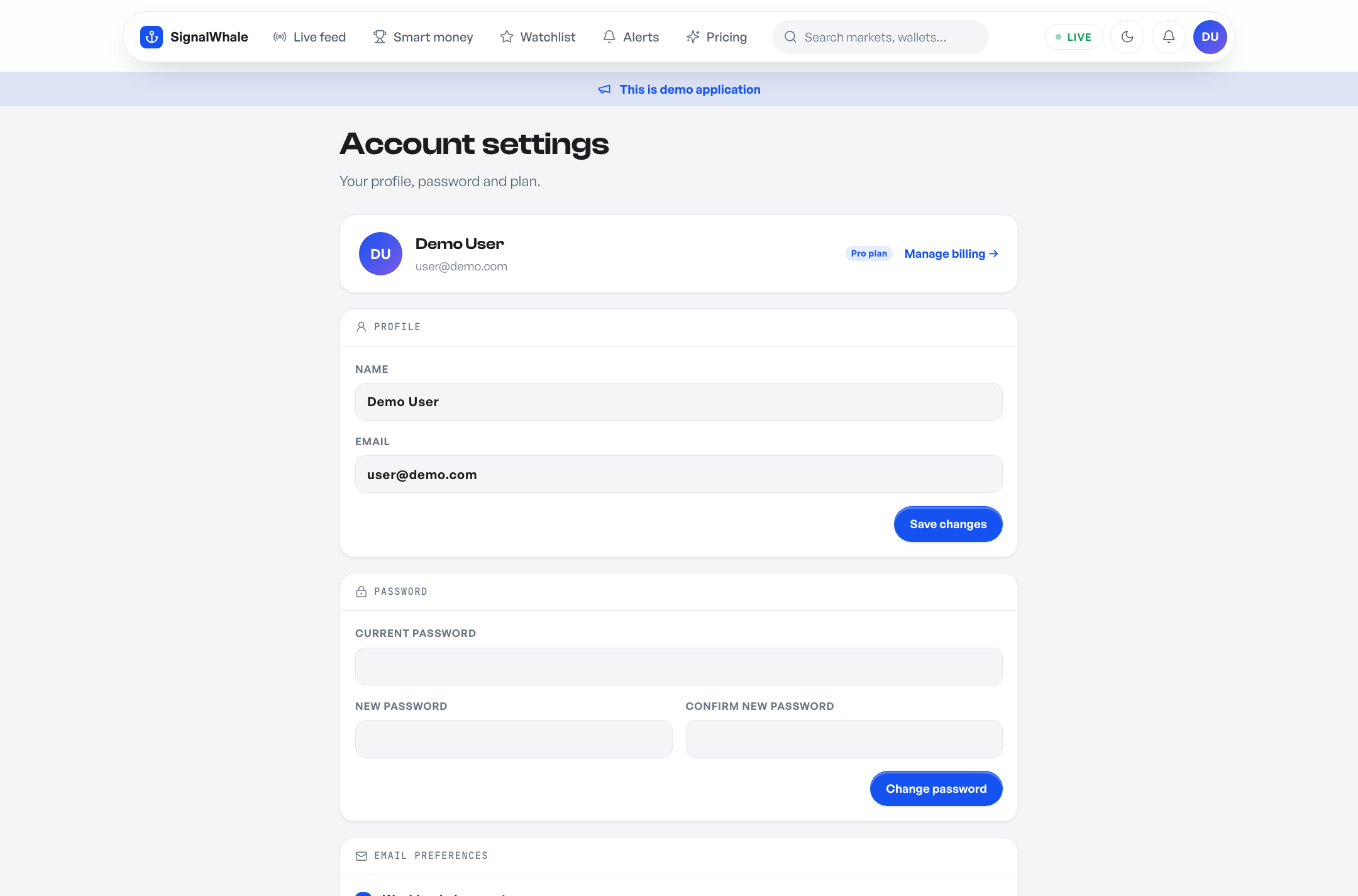
Account settings — profile, password, email preferences.
Customization
Branding & colors
No code needed for the basics: Admin → Settings → Branding lets you rename the product, upload a logo and pick an accent color. For deeper re-theming, the design system lives in CSS custom properties at the top of resources/css/app.css (--accent, surfaces, semantic green/red — defined once per theme). Change the tokens, rebuild:
npm install
npm run buildpublic/build — you only need Node if you change CSS/JS.Whale threshold & feed noise
Admin → Settings → Whale threshold. Trades under this USD size are ignored at sync time. $5,000 is a good default; raise it for a quieter, higher-signal feed. Additionally, the feed automatically drops near-certainty trades (≤4¢ / ≥96¢) — a 99¢ "bet" carries no information.
Adding a data source
Sources implement one interface — app/Sources/MarketSource.php (key(), label(), available(), fetchTrades()). Register your class in SourceRegistry, flip it on in config, and its trades flow through the same ingest → alerts → feed pipeline. KalshiSource is a complete working reference.
Updating
- Back up
.env, your database (database/database.sqlitefor SQLite) and the cached images (public/avatars,public/market-icons). - Upload the new release over the old files (releases never include
.env). - Run
php artisan migrate --force. Done.
FAQ & troubleshooting
The feed is empty after install
Run php artisan whales:sync and read the output table — it names each source and whether it was reachable. The usual cause is a firewall blocking outbound HTTPS to data-api.polymarket.com; ask your host to allow it.
I see a 500 error page
Check storage/logs/laravel.log for the real message. The most common causes are missing write permissions on storage/ and bootstrap/cache/ (755/775, owned by the web-server user).
Emails aren't arriving
Verify SMTP settings in .env; failed alert emails are logged in storage/logs/laravel.log with the provider's error, and alert deliveries show per-channel status on the alerts page.
Data feels stale
Admin → Dashboard shows the age of the newest trade. If it's old: confirm the cron is running. Without cron, the self-healing sync needs page traffic to trigger.
Win rates look different from someone's claimed record
SignalWhale computes records from redemption events plus settled positions (see the /activity endpoint) — an honest, survivorship-bias-corrected method. P&L comes from Polymarket's own cash P&L figures. We deliberately show conservative, verifiable numbers.
How do I make another user an admin?
Admin → Users → edit the user → tick Admin. Admins can't demote or delete themselves.
Can I close public registration?
Yes — Admin → Settings → untick Registration open. The register page then returns 403 and sign-up buttons hide.
Does this work without Stripe / Telegram / SMTP?
Yes. Every integration is optional and independent; the tracker, feed, leaderboard, profiles, watchlists and in-app alerts work with zero external accounts.
Is this financial advice / is it legal to run?
SignalWhale displays public market data for information purposes only — it is not financial advice, and it neither holds funds nor executes trades. Check the regulatory status of prediction markets in your jurisdiction before operating a public instance.
Credits & licenses
| Asset | License |
|---|---|
| Laravel + Cashier | MIT |
| Lucide icons | ISC (bundled locally) |
| three.js | MIT (bundled locally, landing hero only) |
| Clash Display & General Sans | ITF Free Font License (bundled locally) |
| JetBrains Mono | SIL OFL 1.1 (bundled locally) |
| Market data | Polymarket public market-data APIs (docs.polymarket.com) |